
M5 Pro vs M4 Pro: the training side of a Mac mini upgrade
One real training job moved from a Mac mini M4 Pro 64 GB to the new M5 Pro 64 GB: training 13 to 15 percent faster, generation about 20 percent faster, memory unchanged.
%20scale(.916666667)'%20d='M18.9%202H22l-6.8%207.8L23.2%2022h-6.3L12%2014.6%205.5%2022H2.4l8.2-9.5L2.8%202h6.4l4.5%206.8L18.9%202ZM17.9%2020h1.7L8.2%203.9H6.4L17.9%2020Z'/%3e%3c/svg%3e)
Chapters
Most measurements of a new Mac ask how quickly it answers. Fewer ask how quickly it learns. That second question matters when the local work is training a model rather than chatting with one.
We had a real training job to move, so we timed both halves of it on two Mac minis: the M4 Pro 64 GB the work had been running on, and the M5 Pro 64 GB that replaced it on 24 September.
With the same training recipe, data, seed and starting weights, the M5 Pro completed a training update 1.15× as fast as the M4 Pro. Across the full job it averaged 1.14×, finishing 1 800 updates in 2 h 35 min where the M4 Pro needed 2 h 55 min. Generation from the same checkpoint ran about 1.2× as fast, and memory use was unchanged. Both machines have 20 GPU cores.
Another comparison put that gain in perspective. On the M5 Pro, changing the precision setting doubled throughput in a standalone matrix multiplication, yet shortened a training update by only about 3 percent. A faster calculation does not necessarily make the whole job faster by the same amount.
The job we were moving
The workload is a 123M-parameter language model that combines recurrent (gated linear attention) layers with full-attention layers and a mixture-of-experts MLP. We train it in MLX with AdamW at a batch of 4 × 1 024 tokens, with layer rematerialization and a chunked output head.
The stage we measured is a fine-tuning run: 1 800 updates from a pretrained checkpoint on a mixture of tool-use and copy tasks.
It is a small job that we can run repeatedly on the machines we have. It tells us what this model gains, not what a larger one would.
What we compared
| Mac mini M4 Pro | Mac mini M5 Pro | |
|---|---|---|
| Model identifier | Mac16,11 | Mac17,16 |
| CPU | 14 cores | 18 cores |
| GPU | 20 cores, Metal 4 | 20 cores, Metal 4 |
| Memory | 64 GB unified | 64 GB unified |
| macOS | 26.5 (25F71) | 27.0 (26A428) |
| Python and MLX | 3.12.13 and MLX 0.32.2 | 3.12.14 and MLX 0.32.2 |
Both machines ran the same MLX wheel. The Metal library inside it has the same SHA-256 on both, so both used the same library binary.
For the controlled comparison, the M5 Pro ran the M4 Pro's training recipe for 20 updates: same data order, same seed, same starting weights. We selected full float32 arithmetic on the M5, as explained below. The full-run timings and memory figures come from recorded telemetry; the matrix probes were separate measurements.1
What the two machines did
| Measured | M4 Pro | M5 Pro | Speedup |
|---|---|---|---|
| Training, seconds per update, full 1 800-update run | 5.543 | 4.888 | 1.13× |
| Training, seconds per update, identical data, seed and weights (updates 2 to 19) | 5.547 | 4.832 | 1.15× |
| Training job end to end | 10 527 s (2 h 55 min) | 9 270 s (2 h 35 min) | 1.14× |
| End-of-run generation check, 400 prompts | 210.3 s | 176.3 s | 1.19× |
| Validation pass over a fixed slice | 14.6 s | 12.4 s | 1.18× |
| Generation readout from the same checkpoint, 400 prompts | 192.7 s | 157.9 s | 1.22× |
| Whole scoring pass, four readouts including model load | 315 s | 257 s | 1.23× |
| Peak memory during training | 9.42 GiB | 9.44 GiB | unchanged |
For the timing rows, speedup is M4 time divided by M5 time. A ratio of 1.15× means about 15 percent greater throughput, or about 13 percent less time.
The full-run row compares the same shapes and settings on different training data. Of the training rows, only the 20-update comparison matches the data, seed and starting weights. Its second M5 run took 4.846 rather than 4.832 seconds per update, a difference of about 0.3 percent. Both support the same conclusion.
One more detail matters for a small job. The per-update times are not scattered widely: on the full run the M4 Pro ranged from 5.45 to 5.65 seconds between the 10th and 90th percentile, and the M5 Pro from 4.82 to 4.96. Those two ranges do not overlap. They describe variation within each run, not confidence intervals across repeated jobs.
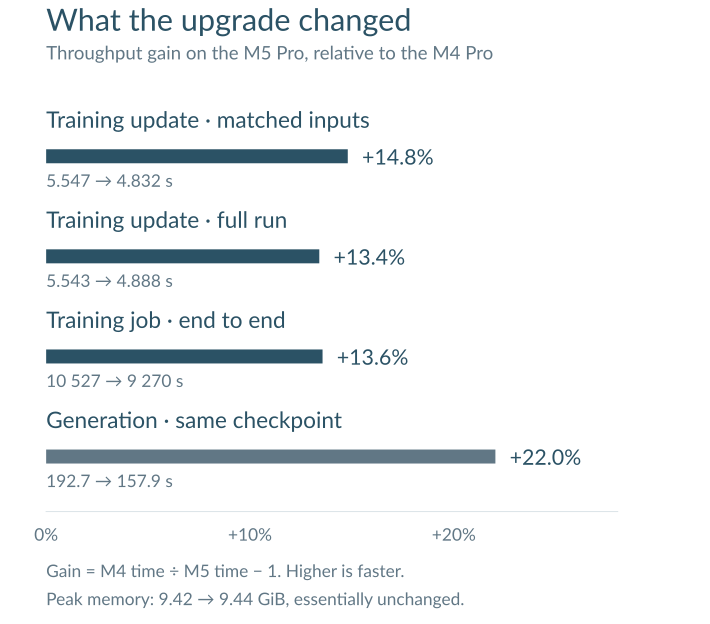
Throughput gain is M4 time divided by M5 time, minus one. The full training jobs used different data with the same shapes and settings; the short training comparison used matched inputs. Memory use was essentially unchanged.
Why training gains less than the matmul numbers
A float32 matrix multiplication of 2 048³ reached 4 433 GFLOP/s on the M4 Pro and 5 736 GFLOP/s on the M5 Pro, about 1.29×. The M5 Pro's default reduced-precision path reached 11 548 GFLOP/s, about 2.6× the M4 Pro's full-precision rate.
The M4 number came from an earlier provisioning probe with a different harness, so those cross-machine ratios are approximate context. The clearer comparison is within the M5: the default path doubled matrix throughput, but shortened a training update by only about 3 percent.
Our interpretation is that the faster matrix path covers only a small share of this workload's elapsed time. Recurrent layers, memory traffic and per-operation dispatch are plausible contributors, and the training matrices also differ from the large standalone probe. We have not profiled those contributions separately.
The practical reading is that a raw matmul ratio does not predict the training gain. Larger models or batches could make better use of the matrix hardware, but that remains a measurement to make, not a result of this comparison.
A precision switch worth knowing about on M5
While qualifying the machine we found something any M5 owner should know before comparing results across Macs.
On the M5 Pro, MLX 0.32.2 runs the float32 matrix multiplication we tested at
reduced precision by default. The environment variable MLX_ENABLE_TF32
defaults to 1; setting it to 0 requests full float32 arithmetic.2
MLX's documentation covers the matrix-multiplication family, including attention,
with the affected operations depending on the backend and hardware. A maintainer
also confirms that the flag enables TF32 when the neural-accelerator path, NAX,
supports the operation.3
Our M1 Max probe was unchanged when we toggled the flag. The M4 Pro runs recorded
1, but their results matched the M5's full-precision mode. The same flag value
therefore did not mean the same arithmetic on the two machines.
For dense float32 matmul, 0 selects full-precision GPU kernels outside NAX;
it does not keep that operation on NAX at higher precision. FP16 and BF16
operations can still use NAX, so this is not a global accelerator-off
switch.4
What we measured on the M5 Pro:
| Reduced precision (default) | MLX_ENABLE_TF32=0 | |
|---|---|---|
| float32 matmul, 2 048³ | 11 548 GFLOP/s | 5 736 GFLOP/s |
| Relative error against float64, 1 024³ | 8.2e-4 | 1.5e-6 |
The error probe used a smaller matrix than the throughput probe. Its metric is the maximum absolute difference divided by the maximum absolute reference value.
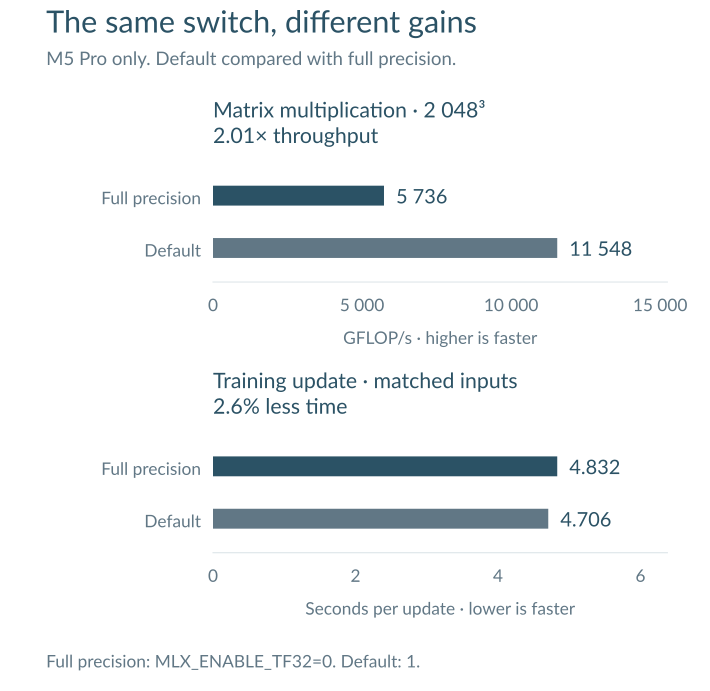
Both comparisons use the M5 Pro. The default path doubles throughput in the matrix probe, while a matched training update takes about 3 percent less time. The bars start at zero; the units and direction are shown for each panel.
The cost of turning it off is real but small: about 3 percent on this M5 training run. Leaving it on changed the numerical results. With the default path, re-scoring a saved model changed 9 of 1 600 outputs and moved log-probabilities by up to 0.56 nats, and the training loss left the M4 Pro trajectory at the first update, by 2.6e-4.
With MLX_ENABLE_TF32=0, the M5 Pro reproduced the M4 Pro's scoring outputs bit
for bit, and 16 of the first 20 training losses were bit-identical, the rest
within 1e-6. Full precision restored exact agreement for the tested scoring
outputs and close agreement for training. That gave us a firmer basis for
comparing the time each machine needed.
There was one practical trap: our trainer initially overrode the value requested in the shell. We caught the mismatch in the run record and corrected the configuration before taking the full-precision timings above. For us the switch now belongs in every run's recorded environment. Check what the running process actually used, not just what the launch command requested.
When the default makes sense
Keeping MLX_ENABLE_TF32=1 can be a useful speed tradeoff for everyday inference
or training, provided checks on the actual model show acceptable output quality
and, for training, convergence. Reduced precision does not by itself mean worse
answers, and training does not automatically require the flag to be off.
We chose 0 to compare numerical behaviour with the older machine. It is also
useful for reference calculations and debugging small differences. The default
offers speed; the workload decides whether that tradeoff is worthwhile. The
roughly 3 percent cost here is a result for this job, not a general price for
full precision.
What this does not say
- It is one workload at one model size. This is not a chip benchmark. It says nothing about inference with large models, and nothing about a training job that needs more of the 64 GB than this one does.
- The two machines differ in more than the chip. They ran different macOS builds, 26.5 against 27.0. They match on GPU core count, memory capacity and MLX wheel, and this comparison cannot separate the operating system from the silicon.
- One or two runs per cell. We would not read anything below 1 or 2 percent into these numbers.
- Nothing here about model quality. We measured time, not whether the model became better at its task.
How we measured
| Setting | Value |
|---|---|
| Model | 123M-parameter hybrid language model with a mixture-of-experts MLP |
| Training stage | Fine-tuning, 1 800 updates from a pretrained checkpoint |
| Batch | 4 × 1 024 tokens |
| Optimizer | AdamW |
| Framework | MLX 0.32.2, Python 3.12.13 (M4 Pro) and 3.12.14 (M5 Pro) |
| Controlled arm | 20 updates, same training recipe, data order, seed and starting weights |
| Memory policy | Layer rematerialization, chunked output head |
| Precision | Full float32 behaviour; M4 recorded MLX_ENABLE_TF32=1, M5 recorded 0 |
The measurements are transcribed from run telemetry and separate matrix probes. The training data, the model checkpoint and the run logs are internal, so the source note is not public. The measurement transcript lists the exact values behind every table above, so the arithmetic can be checked without access to our machines.1
What to take from it
If the question is whether the new Mac mini made our small-model training faster, our answer is yes. The M5 Pro gave us a 13 to 15 percent faster training loop and about 20 percent faster generation, with the same memory footprint and the same 20 GPU cores. The complete job finished about 21 minutes sooner. That is useful time for another iteration, although this comparison cannot separate the chip's contribution from the different macOS versions.
If the question is how much a faster matrix path helps this training job, the answer is much less than the standalone probe suggests. On the M5, default precision doubled matrix throughput but shortened an update by only about 3 percent. The workload decides how much of a hardware advantage becomes time saved.
And if you compare float32 work across Macs, check the precision mode first.
For this job, MLX_ENABLE_TF32=0 on the M5 cost a few percent and brought the
numerical results back into close agreement. A useful comparison starts with
knowing what the machines actually calculated.
Footnotes
-
Measurement transcript. Timings, memory, precision checks and matrix-probe values for a Mac mini M4 Pro 64 GB (Mac16,11) and a Mac mini M5 Pro 64 GB (Mac17,16), with both short M5 training trials retained. This is a transcription of the measurements, not a public reproduction kit. ↩ ↩2
-
MLX v0.32.2,
mlx/utils.h, whereMLX_ENABLE_TF32defaults to1, and Numerical Precision, which documents the full-precision opt-out and hardware-dependent behaviour. ↩ -
ml-explore/mlx, issue 3235. A maintainer answered on 10 March 2026 that TF32 is supported by NAX and the flag enables it when available for the operation; the issue was closed that day. ↩
-
MLX v0.32.2,
matmul.cpp. Theuse_naxcondition requiresenable_tf32()for float32 inputs. This describes source-level dispatch, not a hardware trace of our whole training job. ↩